Tutorial of ITS Speedy Campus Transition 2017
Published on
Friday, 7 July 2017
Tutorial of transferring the Speedy Campus ITS domain to telkom.net after deactivation:
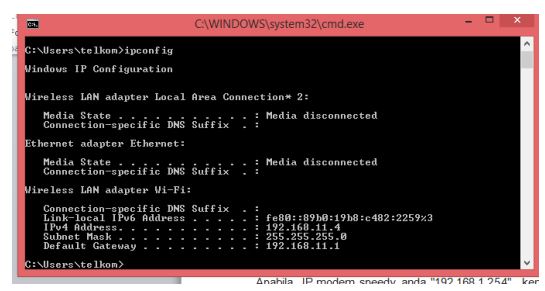
- Make sure your IP matches the modem gateway IP 192.168.1.1 or 192.168.1.254 because it is the default modem
- Check through the command prompt (windows)
- Click “Local Area Connection”
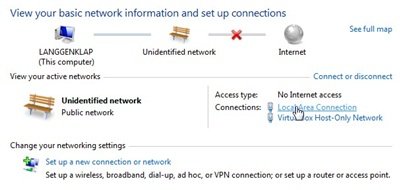
- Click “Details ..” and look at the IPv4 Default Gateway section

- If your speedy IP modem is “192.168.1.254”, then type in the browser your favorite (firefox or chrome) http://192.168.1.254
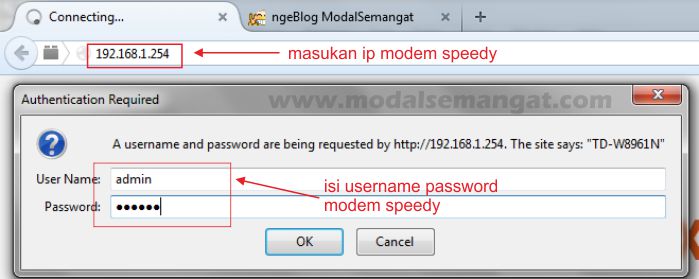
- For the modem user / password there are several defaults depending on the modem type:
- admin / admin
- user / user
- support / theworldinyourhand
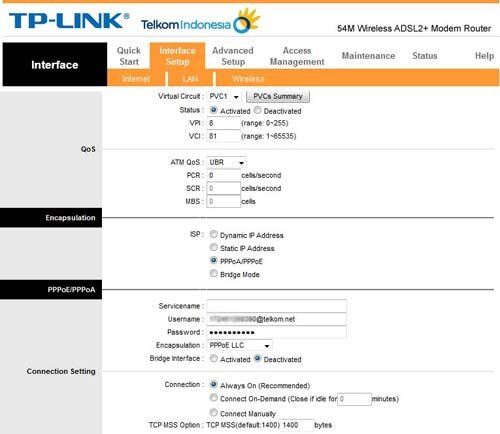
-If you’ve entered the modem page, select the Interface Setup >> LAN menu, then in the PPoE / PPoA section change the username speedy @its.edu.net to be @ telkom.net
– Then click the Save button
– Your speedy has changed to the telkom domain
The tutorial can be downloaded here.