
SERVICE
Service Internal
Licensed Software
Education Roaming
Internet
myITS-WiFi-IOT
Multi Factor Authentication
governance
Masterplan ICT
Service Procedure ICT
Guide
About Us
About DPTSI
Organizational Structure
Vision Mission Strategy
Contact Us
Privacy Policy
ISMS Data Center ITS
SERVICE
Service Internal
Licensed Software
Education Roaming
Internet
myITS-WiFi-IOT
Multi Factor Authentication
governance
Masterplan ICT
Service Procedure ICT
Guide
About Us
About DPTSI
Organizational Structure
Vision Mission Strategy
Contact Us
Privacy Policy
ISMS Data Center ITS
ID
EN
MyITS
SERVICE
governance
About Us
Privacy Policy
ISMS Data Center ITS
SERVICE
governance
About Us
Privacy Policy
ISMS Data Center ITS
ID
EN
MyITS
SERVICE
Service Internal
Licensed Software
Education Roaming
Internet
myITS-WiFi-IOT
Multi Factor Authentication
governance
Masterplan ICT
Service Procedure ICT
Guide
About Us
About DPTSI
Organizational Structure
Vision Mission Strategy
Contact Us
SERVICE
Service Internal
Licensed Software
Education Roaming
Internet
myITS-WiFi-IOT
Multi Factor Authentication
governance
Masterplan ICT
Service Procedure ICT
Guide
About Us
About DPTSI
Organizational Structure
Vision Mission Strategy
Contact Us
Headline
November 5, 2021
How to Register myITS Wali
Hello ITS New Students !! Did you already know about the myITS Wali application? For those who have not registered...
August 24, 2021
SPAM Email Notification
Dear ITS Academic Civitas, If you receive an email on behalf of *Admin@its.ac.id* containing information on blocking your email account...
September 22, 2020
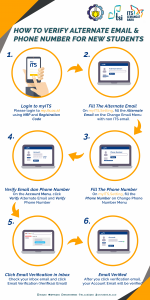
A Guide to Alternate Email and Mobile Phone Verification for New Students
The new school year has arrived for all ITS students. The initial stage as a student is to understand one...

May 2, 2019
The Launching of myITS Wali Application and SIM Prestasi
On April 30, 2019, ITS introduced 2 new services namely myITS Wali and SIM Prestasi. myITS Wali service is a...
September 26, 2018
How to Setup Email for Lecturers and Employees on Android
How to set up on an Android phone: On an Android cellphone, click the “Mail” -> Icon then select “Inbox”...
«
1
2
3
»