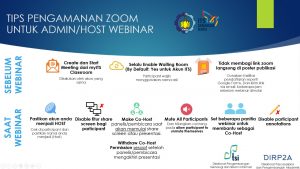
There are several things that we need to understand in using the Zoom application, including how to maintain Data Security when or before doing a Webinar. Especially for the Admin / Host Webinar, this is an important preparation that must be done to safeguard important information in it. The following are Zoom Security Tips for Webinar Admins / Hosts:
- Before the Webinar:
- Create and Start Meeting from myITS Classroom is done from the same account.
- Always Enable Waiting Room (by Default: Yes for ITS Accounts), provided that participants must use their real names.
- Do not share the Zoom link directly in the publication poster. Use facilities like Microsoft Form or Google
- Forms and send a link via email a few hours before the webinar starts.
- During the Webinar:
- Make sure your account is a Host. Check on Participants and make sure your name becomes “Host”.
- Disable share screen feature for participants.
- Make Co-Host panelist / speaker when going to start share screen or presentation. And Withdraw Co-Host Permissions shortly after the panelist / speaker ends the presentation.
- Mute All Participants and uncheck allow participants to unmute themselves.
- Set several webinar committees to help as Co-Hosts.
- Disable participant annotations.