Academics


Facilities
Research and Collaboration
About Us

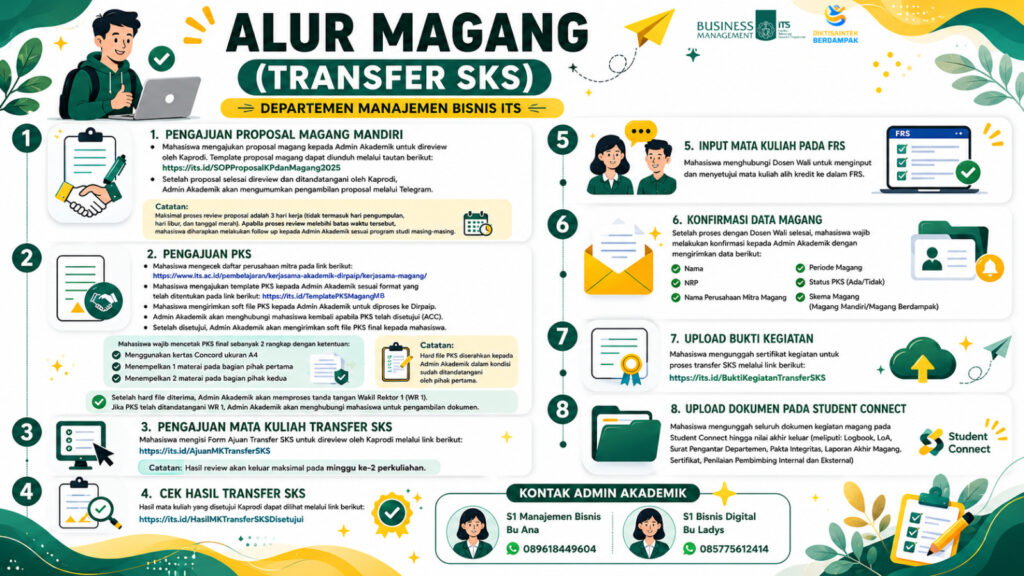
Note: The hard copies of the PKS must be submitted to the Academic Administration after they have been signed by the First Party.
- After receiving the hard copies, the Academic Administration will process the document for the signature of the Vice Rector I (WR I). - Once the PKS has been signed by WR I, the Academic Administration will contact the student to collect the document.2. Submission of Courses for Credit Transfer
Students complete the Credit Transfer Course Application Form for review by the Head of Study Program through the following link: https://its.id/AjuanMKTransferSKSNote: The review results will be available no later than the second week of lectures.
3. Check the Approved Credit Transfer Review Results
The list of courses approved by the Head of Study Program can be viewed through the following link: https://its.id/HasilMKTransferSKSDisetujui4. Input Courses into the Study Plan (FRS)
Students should contact their Academic Advisor to input and approve the approved credit-transfer courses in the FRS.
5. Internship Data Confirmation
After completing the process with the Academic Advisor, students must confirm their internship information with the Academic Administration by providing the following data:
- Name - Student ID (NRP) - Name of Internship Partner Company - Internship Period - PKS Status (Available/Not Available) - Internship Scheme (Independent Internship/Impactful Internship)6. Upload Activity Evidence
Students must upload their activity certificate for the credit transfer process through the following link: https://its.id/BuktiKegiatanTransferSKS7. Upload Documents to Student Connect
Students must upload all internship-related documents to Student Connect until the final grade is issued, including: - Logbook - Letter of Acceptance (LoA) - Department Introduction Letter - Integrity Pact - Final Internship Report - Certificate - Internal and External Supervisor Assessments